

An ECU software reference file is an unmodified copy of the software an ECU is expected to run, kept as a baseline you can compare against, restore from or use when replacing a unit. It is only useful if it matches your ECU’s hardware number, software number and calibration ID, and if you know whether your own read was a full read or a flash-only read. This article covers how to identify the right reference, what to verify before you rely on it, and where original files fit in repair, replacement and diagnostic work.
TL;DR
- A reference file is a stock (ORI) software image used as a baseline. The label “stock” alone does not prove it is factory software, so verify identifiers.
- Match hardware number (HW), software number (SW), software version and calibration ID against your own ECU read, not only the vehicle model or engine code.
- File size, memory layout, checksum requirements and read/write procedures vary by ECU family, software version and tool. Never assume one procedure fits all.
- Distinguish a full ECU read from a flash-only (calibration-area) read, and record what your tool actually read.
- Original ECU Files supplies stock .bin files at a fixed €19.99 per file, not tuning maps and not programming or diagnostic services.
Table of Contents
- What counts as a reference file
- Where original files are used in the workshop
- How to identify the correct reference file
- Full read or flash-only read
- Why file size and checksums are ECU-specific
- Check the reference against what is on the bench
- Reference files in fault diagnosis
- Where to get original files
- Documenting a job so the reference stays useful
- FAQ
- Sources
What counts as a reference file
In ECU work, the contents of the flash memory saved to a file is called a dump. OpenRemap’s glossary defines a stock file as an unmodified dump, and it points out that “stock” can mean either the factory software or whatever tune the ECU was carrying when it was read. That distinction matters for anyone using a file as a reference. A dump pulled from a vehicle that was previously remapped is stock in the sense of “untouched by you”, not original in the sense of “as released by the manufacturer”.
That is why a dedicated source of original files exists as its own category. A reference file in the sense used here is the factory-state software for a given ECU, identified by its hardware and software numbers. It is not a modified file and it is not a diagnostic database.
Reference files are not diagnostic descriptions
The phrase “ECU software diagnostics reference” often mixes up two different things. One is the software image that runs on the ECU. The other is the data that describes how to talk to it.
The Mercedes-Benz odxtools project describes ODX as an XML-based format for machine-readable ECU diagnostic capabilities, standardized as ISO 22901 and maintained by ASAM. It says ODX complements UDS by describing vehicle- and ECU-specific diagnostic functions. That data tells a tester which services, parameters and variants an ECU supports. It does not contain the ECU’s firmware.
A stock .bin file is the firmware side. Original ECU Files sells the .bin side only. Keeping the two separate avoids a common mistake: expecting a software image to carry the description of its own memory or its diagnostic services.
Original ECU Files supplies unmodified stock ECU software in .bin format. Nothing in an original file download should be assumed to include DAMOS or A2L description files.
Where original files are used in the workshop
The practical uses for professionals fall into a handful of jobs:
- ECU repair and restoration. When memory is corrupted, an interrupted write or a failed update has left the unit unresponsive, or an EEPROM or flash device has been replaced, an original image gives you a known baseline to restore from.
- Replacement and cloning. A replacement unit has to carry software consistent with the vehicle. A stock reference helps confirm what the unit should hold before any vehicle-specific data is dealt with.
- Baseline for comparison. HP Academy’s WinOLS file-management lesson recommends saving the stock calibration as a baseline and keeping separately named versions, so you can revert and inspect changes against the original. A clean original lets that comparison mean something.
- Verification. Comparing a customer’s read against a known original shows whether the software has been changed, provided the two are the same hardware and software variant.
The same logic applies across vehicle types: passenger cars, commercial vehicles, motorcycles and agricultural machinery all use ECUs with their own families and software structures. Original ECU Files covers more than 196,000 files across more than 500 brands, including commercial and agricultural applications, for example MAN and Case.
How to identify the correct reference file
The vehicle model and engine code narrow the field. They do not pick the file. The same car can carry different ECU hardware or software depending on production date, market or a later update.
DevCom Diagnostika’s article on same car, different software says that when you are investigating a new or unrecognized software variant, identification should include the hardware number, software number, software version, calibration identifiers where available and the VIN. The same article notes that an OEM update can produce an ECU state that an aftermarket diagnostic database does not yet identify unambiguously, and that not every update changes the diagnostic interface.
The diagnostic world works the same way. According to KPIT’s description of the diagnostic trouble code lifecycle, a tester identifies the vehicle, selects its ODX VehicleInformationTable, and then determines the ECU software version through variant identification. Software version is a deciding step even in OEM-style workflows.
The identifiers to compare
| Identifier | What it tells you | Where you get it |
|---|---|---|
| Hardware number (HW) | The physical unit and board revision | Label on the ECU, and the identification data in your read |
| Software number (SW) | The software release stored in the unit | Identification block in your read, or your tool’s ECU info screen |
| Software version | Revision within a software family | Same sources as SW, where the ECU reports it |
| Calibration ID | The calibration dataset within that software | Where the ECU or your tool exposes it |
| ECU manufacturer and type | The ECU family (for example Bosch, Delphi, Denso) | Label and read data |
| VIN | The vehicle the unit came from | Vehicle documentation |
Which of these an ECU actually stores, and how your tool shows them, varies by ECU family and tool. If one identifier is missing from your read, say so in your job notes rather than filling it in from an assumption.
The rule for any purchase is simple: compare every available identifier on the listing with your own ECU read. A match on the SW number with a different HW number, or the other way round, is not a match.
For Bosch units specifically, the guide on how to identify a Bosch ECU and find its original file walks through the identification approach. To browse by manufacturer and ECU type, use the original ECU files by ECU type listing.
Full read or flash-only read
This is where reference files most often get misused. Two reads of the same ECU can be very different objects.
- A full ECU read captures the memory regions the tool and method can reach for that ECU family. Depending on the unit that may include flash, EEPROM and other areas.
- A flash-only read captures the program and calibration flash and may leave out data held elsewhere, such as EEPROM contents.
What each includes depends on the ECU, the tool and the connection method (OBD, bench or boot). There is no universal list.
AXION Automotive’s repair guide on why flash file size does not prove a complete backup makes a point that every workshop should keep: file size alone cannot establish that a read is complete, because tools may read different regions or package data differently. It advises recording the read tool, the operation, the ECU hardware identification, the date and the memory areas, and not describing a calibration-only file as a full backup without evidence.
In practice that gives you a short routine for every job:
- Record the tool, the connection method and the operation you performed.
- Record HW, SW, software version and calibration ID as read from the unit.
- Note which memory areas the read covered.
- Label the file by what it is (full read, flash-only, calibration-only), not by what you hope it is.
A reference file is a stock software image in .bin format. Whether it can be written to a particular ECU, and in what form, depends on the unit and on the tool you use.
Why file size and checksums are ECU-specific
Two things make “just flash the original” unsafe as a general statement.
Memory layout. The size and structure of a file depend on the ECU family and software version. A file that is the right size is not necessarily the right file, and a file that is a different size is not necessarily wrong, since tools package data differently.
Checksums. Many ECUs verify integrity data over code or calibration segments. Vector’s AUTOSAR calibration manual shows the general idea in the calibration context: a HEX file and its A2L description can be treated as a unit, and checksums of ECU code segments compared with the ECU to check version compatibility. It also describes the software-version check using an XCP station identifier, an EPK identifier or code-segment checksums. Those are examples of how identity and integrity can be tested. The checks your ECU and tool actually use depend on the family and the tool, so follow the procedure for that unit, not a generic one.
The same manual explains that an A2L file links symbolic names for measurement and calibration objects to their memory addresses, and that a separate A2L is required for each ECU. That is why a stock image and a description file are two different deliverables, and why a .bin alone does not tell you where individual maps sit.

Check the reference against what is on the bench
Before you rely on any reference file, run these checks in order.
- Read the unit first. Take your own read and record the identifiers. Do not work backwards from the vehicle description.
- Compare HW, SW, version and calibration ID with the reference listing, each one, not just the SW number.
- Confirm what you read. Full read or flash-only? A reference of a different scope is not like-for-like.
- Beware the virtual read. HP Academy’s lesson warns that a virtual read can use ECU identification to retrieve an original calibration, which can omit earlier tuning changes present in the vehicle. If the question is what the car is actually running, only a read from the car answers it.
- Keep the original untouched. Save the reference as a baseline and work on copies with clear names.
- Check the tool’s own requirements. Read/write procedures, required modes and checksum handling differ by tool and ECU family. Consult the documentation for your tool and the unit.
The ComAp guide for electronic engine support gives a plain version of the same principle for integration work: start by studying the ECU documentation and checking compatibility with the intended application.
Reference files in fault diagnosis
A software reference is not a fault-finding tool in itself, but it supports diagnostics in two ways. It lets you confirm that the software in a unit is what you think it is, and it gives you a baseline when behavior changes after an update, a repair or a swap.
Fault memory is a separate layer. Vector’s article on efficient ECU tests with fault memory explains that UDS diagnostic information includes trouble codes, status masks and, optionally, OEM-specific environmental data that can record measurements and event context. A second Vector article on data-driven diagnostic validation adds that fault-memory testing depends on documented DTC setting conditions and their relationship to ECU inputs and outputs, not just the code label.
So a stored code points you at a condition, and the software version tells you which set of conditions applies. For shops building out fault-memory and scope-based testing beyond the OEM tool, this overview of diagnostics without OEM tools covers the J2534 and scope side of the work.
The odxtools project also offers a compare function for PDX diagnostic databases, reporting changes such as added or deleted services and altered service parameters. The principle carries over to software: when you can compare a known baseline against what is installed, you can say precisely what changed.

Where to get original files
Original ECU Files is an online database of original, unmodified ECU software files for ECU repair technicians, diagnostic specialists and tuning workshops. The catalog holds more than 196,000 files across more than 500 vehicle brands, and you can search by brand, model, engine variant, ECU manufacturer, ECU type, hardware number, software number and calibration ID.
Every file is sold individually at a fixed €19.99. Payment runs through Stripe checkout, and the download link is emailed automatically once Stripe confirms payment.
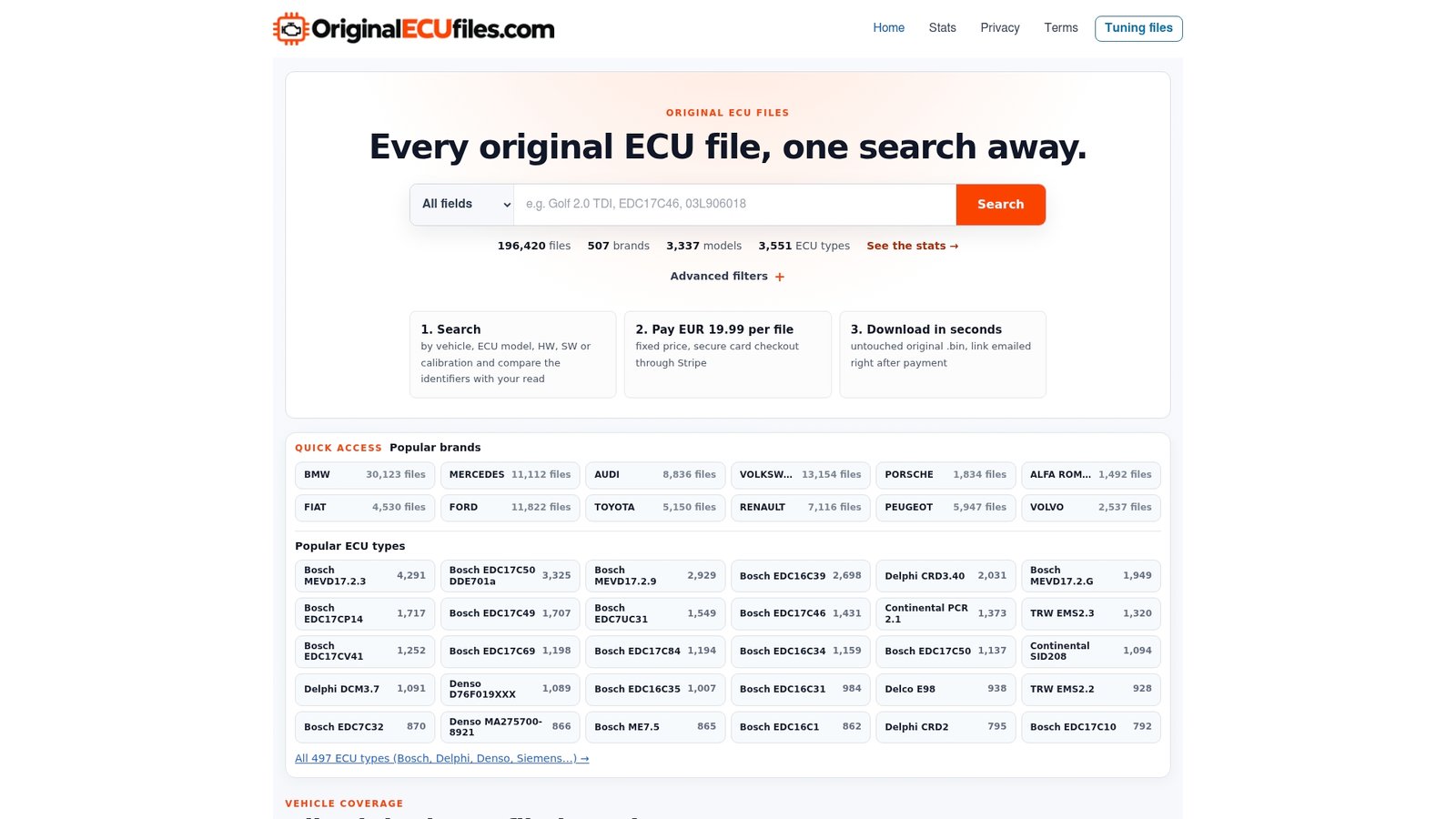
The service supplies stock .bin files only. It does not sell modified tuning maps, and it is not a tuning, ECU programming or diagnostic support service. Verify the hardware, software and calibration identifiers against your own read before you buy. You can search the full catalog on the Original ECU Files homepage, or go straight to a brand page such as Ford.
Documenting a job so the reference stays useful
A reference only protects you if the record around it is clear. For each job, keep:
- The ECU label details and photos where useful.
- The identifiers from your read, with the tool used.
- The scope of the read (full or flash-only) and the memory areas covered.
- The identifiers of the reference file you matched it to, and how each compared.
- The file names of any working copies, so the original baseline is never overwritten.
This takes minutes and prevents the most common failure in the field: a file that was matched by model name, used on a unit with a different software variant, and never traced back.
FAQ
What is the difference between an original file and a tuning file?
An original file is the unmodified factory-state software for an ECU, used as a baseline or for restoration. A tuning file has had its calibration changed. Original ECU Files supplies original .bin files only, not modified maps.
Is a “stock” read always the factory software?
No. OpenRemap’s glossary notes that stock can mean either factory software or the tune the ECU carried when it was read. If the vehicle was ever remapped, your read reflects that, so compare identifiers against a verified original.
Which identifiers should I match before buying a file?
Compare the hardware number, software number, software version and calibration ID, where your ECU reports them, with the listing. Include the ECU manufacturer and type, and the VIN for your records. A match on only one number is not enough.
Does file size tell me my read is complete?
No. Tools read different regions and package data differently, so size alone does not prove a full read. Record the tool, the operation and the memory areas, and label calibration-only or flash-only reads as such.
How is the file delivered?
After Stripe confirms payment, the download link is sent automatically by email. Each file costs €19.99.
Sources
- Glossary | OpenRemap Docs
- odxtools README, Mercedes-Benz
- WinOLS file management lesson, HP Academy
- Same Car, Different Software, DevCom Diagnostika
- The Lifecycle of a Diagnostic Trouble Code, KPIT
- Why ECU flash file size does not prove a complete backup, AXION
- User Manual AUTOSAR Calibration, Vector
- Electronic Engines Support Reference Guide, ComAp
- Efficient ECU Tests with Fault Memory, Vector
- Automated Data-driven Validation of the Diagnostic, Vector
- Diagnostics Without OEM Tools: J2534 and Scope Tests for Shops