

Most problems with buying an ECU file come from four places: an identifier that was never compared with the ECU read, a payment that stalled at the bank, a delivery email that did not arrive, or a price that looks different on the card statement than at checkout. Each has a routine that takes minutes. This guide covers them for workshops that buy original (stock) files for repair, restoration and replacement work. At OriginalECUfiles every file is a single purchase at a fixed €19.99, paid through Stripe checkout, with the download link emailed automatically once Stripe confirms payment. The routines below work with that flow.
TL;DR
- Match the hardware (HW) number, software (SW) number and calibration ID from your own ECU read against the listing before you pay. A brand and model match is not enough.
- Know whether you hold a full read or a flash-only read. It decides what a stock file can be compared against and how it is used.
- A declined or pending payment is usually a temporary bank authorization hold. Check your email and your bank before paying a second time.
- If no email arrives, check the address you typed, spam and promotions folders, and your payment receipt before assuming anything failed.
- The catalog price is €19.99 per file. Your card statement may show a different amount in your own currency because of conversion.
Table of Contents
- Where purchase problems actually start
- Identify the ECU before you search
- Full read or flash-only read
- Comparing identifiers on the listing
- Payment problems: declined, pending, charged twice
- Delivery problems: the file did not arrive
- Price confusion: €19.99 and what your card shows
- Where this routine fits in the shop
- Find the exact stock file
- FAQ
- Sources
Where purchase problems actually start
People searching for an ECU file purchase problem usually describe the symptom: the file did not work, the payment did not go through, the email never came. The cause often sits earlier in the chain. A tech buys a file by vehicle name, writes it, and discovers the ECU was a different hardware revision. Or a payment page times out, the buyer pays again, and two pending charges appear.
The fix is a short, repeatable order of operations: identify, compare, pay once, confirm delivery, store the file with the job record. The sections below follow that order.
Identify the ECU before you search
The vehicle is only the starting point. Similar models can use different control units depending on engine, transmission, emissions specification, market or production date. The identifiers on the ECU itself and in your read are what decide the match.
Collect these before opening a catalog:
- VIN, brand, model, year, engine and transmission
- ECU manufacturer and module type (for example Bosch EDC17, MD1, MG1 or ME7 families)
- Hardware number (HW)
- Software number (SW) and, where your tool shows it, the calibration ID
- A photo of the ECU label
If you are still working out which engine variant a vehicle carries, finding and using the engine ID number is a sensible first step before you look at control unit identifiers.
Hardware number versus software number
The two numbers do not carry the same weight. The hardware number identifies the physical unit: board revision, processor family, memory layout and connector configuration. The software or calibration number changes when a dealer reflashes the module, and on used parts the sticker is often not updated after a reflash. According to a US module repair shop’s pre-purchase checklist, a wrong software number can usually be fixed by overwriting, while a wrong hardware number usually leaves the unit unusable for the job.
In practice: treat the HW number as the gate. If it does not match, stop. Treat the SW number and calibration ID as the second check, and read them from the ECU itself rather than trusting a label.
Why a typed identifier needs a second look
Some identifiers, such as an MCU ID used by certain tools for authentication, are long strings. One vendor’s documentation warns that a single wrong character in a manually typed MCU ID produces an invalid file, and recommends confirming that hardware number, software version and MCU ID match the target ECU exactly. Copy identifiers from your read instead of retyping them, and compare character by character.
Full read or flash-only read
The type of read you hold changes what you are comparing and what you can do afterward.
| Read type | What it typically contains | What it means when you buy a stock file |
|---|---|---|
| Full read | Flash plus other memory areas the tool can access, depending on ECU and tool | More data to compare against; the file layout you receive should be checked against the structure of your read |
| Flash-only read | The program flash area only | Other areas such as EEPROM are not in your read, so identification must rely on the numbers you can obtain |
Which areas exist, how large they are, and how a tool reads and writes them varies by ECU family, software version and tool. There is no universal rule that a given file size is correct. File size is a useful warning sign: a big difference from your read should be investigated. But matching size does not prove compatibility, so never use size as the deciding test.
Checksum requirements are also ECU-dependent. Some workflows need checksum verification or correction before writing, others do not, and your tool’s own warnings about identification or checksum should stop the job rather than be clicked through.
One more distinction matters when you buy from any database. A real read pulls the exact binary from the ECU in front of you. A file matched from a database by software number is a stock reference, and it is not guaranteed to be identical to what is currently on the vehicle if the ECU was updated or modified earlier. That is why the original ECU read should always be saved untouched before anything is written.
Comparing identifiers on the listing
On originalecufiles.com you can search by brand, model, engine variant, ECU manufacturer, ECU type, HW number, SW number and calibration ID. Hardware-number pages group the files for one unit. For example, the page for Bosch EDC17CP10 hardware number 0054469440 lists 39 files, and the page for Bosch ME7.3 hardware number 0261204841 lists 14. Several files under one HW number is normal: different software versions and applications share hardware.
That is exactly where the second comparison matters. Once you land on the HW page, narrow by SW number and calibration ID against your read, not by what looks closest. If your identifiers do not appear, do not substitute a near neighbor.
For brand-level browsing, the catalog has pages such as MAN, Ford and GM, covering commercial vehicles and passenger cars alike, with agricultural and motorcycle brands also listed.
A pre-payment checklist
- Vehicle identity recorded: VIN, model, year, engine, transmission.
- ECU manufacturer and type match the listing.
- HW number matches exactly.
- SW number and calibration ID match, or you understand and have documented the difference.
- You know whether your read is full or flash-only, and what your tool needs.
- Your original read is saved separately and will not be overwritten.
- The file is for the stated job (repair, restoration, replacement), and the job is recorded.
The files are original, unmodified stock software in .bin format. They are references for technical work, not tuned maps, and the service does not program, tune or diagnose your ECU. Procedures for reading and writing belong to your own tool and workflow.
Payment problems: declined, pending, charged twice
Stripe processes the checkout. Most payment confusion is not a failed purchase but the bank’s handling of an authorization.
Declined payments
Read the exact message on the checkout page: declined card, card detail error, expired session or a connection error. A digital-file vendor’s help page makes the same point: check what the checkout message says, then check your receipt email before retrying. If the connection dropped mid-payment, wait and check your inbox rather than paying again. Typical causes of a true decline are insufficient funds or a card issuer blocking an unusual or foreign merchant. In that case, contact the card issuer before trying again.
Pending charges that look like duplicates
A failed attempt can leave a temporary authorization hold. The funds were not taken, and the bank releases the hold automatically on its own timeline, which the merchant cannot speed up. If a second attempt succeeded, the earlier pending item can look like a double charge until it drops off. How long that takes depends on your bank. One UK bank says a pending failed payment usually clears within up to 7 days, but US issuers set their own timelines, so ask yours if it lingers.
Before concluding you were charged twice, compare these:
| What you see | Likely meaning | What to do |
|---|---|---|
| One completed charge and a confirmation email | Normal purchase | Check the download email |
| One completed charge and one pending item | Earlier attempt’s hold | Wait for the bank to release it |
| Two completed charges, two orders | Genuine duplicate | Gather order details and contact the seller, then the bank if unresolved |
| Charge but no email | Delivery issue or wrong address | See the next section |
If the issue stays unresolved
Contact the seller first and keep notes of when and how. Pending credit card payments cannot be disputed until they post, though pending debit payments sometimes can, and disputes can cover non-receipt, wrong goods and double charges. That page describes UK rules, so check your own card issuer’s terms in the US. Whoever you write to, include the email used at checkout, the date, the amount and the exact error text. Never send a full card number or security code.
Delivery problems: the file did not arrive
On this site the download link is emailed automatically after Stripe confirms payment. So a missing email points to a short list of causes:
- Payment not confirmed. A pending or failed attempt means no link has been issued. Check your bank first.
- Typo in the email address. Look at the receipt from the payment processor, which shows the address used.
- Mail filtering. Check spam, junk, promotions and any company mail quarantine. Workshop domains with strict filters are a common place for automated messages to land.
- Shared or full mailbox. A full inbox rejects messages.
- Link opened on a locked-down workshop PC. If the link does not open, try another browser or device before concluding it is broken.
Keep the order confirmation, since it is the record you will need if you contact the seller. Nothing here is a promise of a delivery time or a support service: it is the order in which to rule things out.
After the download
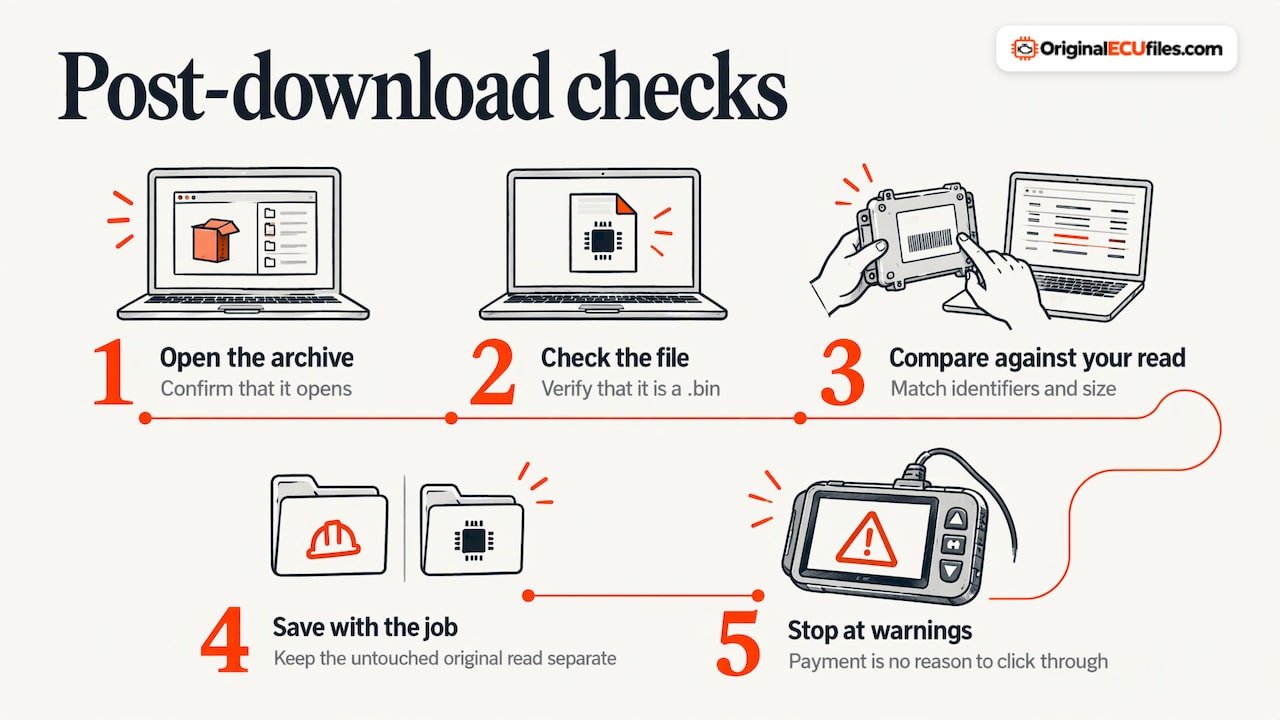
Check that the archive opens and that the file is a .bin. Compare its identifiers and size against your read, store it with the job record, and keep the untouched original read in a separate folder. If a tool warns about identification or checksum, stop and resolve it. Do not push through a warning because the file was paid for.
Price confusion: €19.99 and what your card shows
The catalog price is €19.99 per file, one-off, with no per-hour or per-ECU tiers. The numbers that differ come from outside the catalog:
- Currency conversion. The charge is in euros. A US card turns it into dollars at the issuer’s rate, so the statement amount moves with the exchange rate.
- Foreign transaction fees. Some issuers add one for merchants abroad. The EU’s consumer guidance notes that paying in another currency can add a foreign transaction fee and a conversion fee, and paying in the local currency is often cheapest. Check your card’s terms; many business cards differ from consumer cards.
- Multiple files. Each file is priced separately. Buying three candidates because you are unsure of the match costs three times €19.99, which is another reason to do the identifier comparison first.
For an exact charge, the checkout page and your payment receipt are the reference, and your bank’s statement shows the final converted amount.
Where this routine fits in the shop
A per-file price at €19.99 is small next to the cost of a failed write or a unit that has to be replaced. The expensive mistake is rarely the purchase itself. It is writing a file that was never verified against the ECU on the bench. The workshops that avoid it treat identification as part of the job record, not a step to speed through.
The catalog is built around that routine: search by HW number, SW number and calibration ID, find the exact stock file, pay once, receive it by email. It supplies the stock .bin reference. It does not include DAMOS or A2L files with the download.
Find the exact stock file
If you have your read and the identifiers in front of you, you can search the original ECU files catalog by HW number, SW number, calibration ID or vehicle. Each file is €19.99, and the link is emailed once Stripe confirms payment.
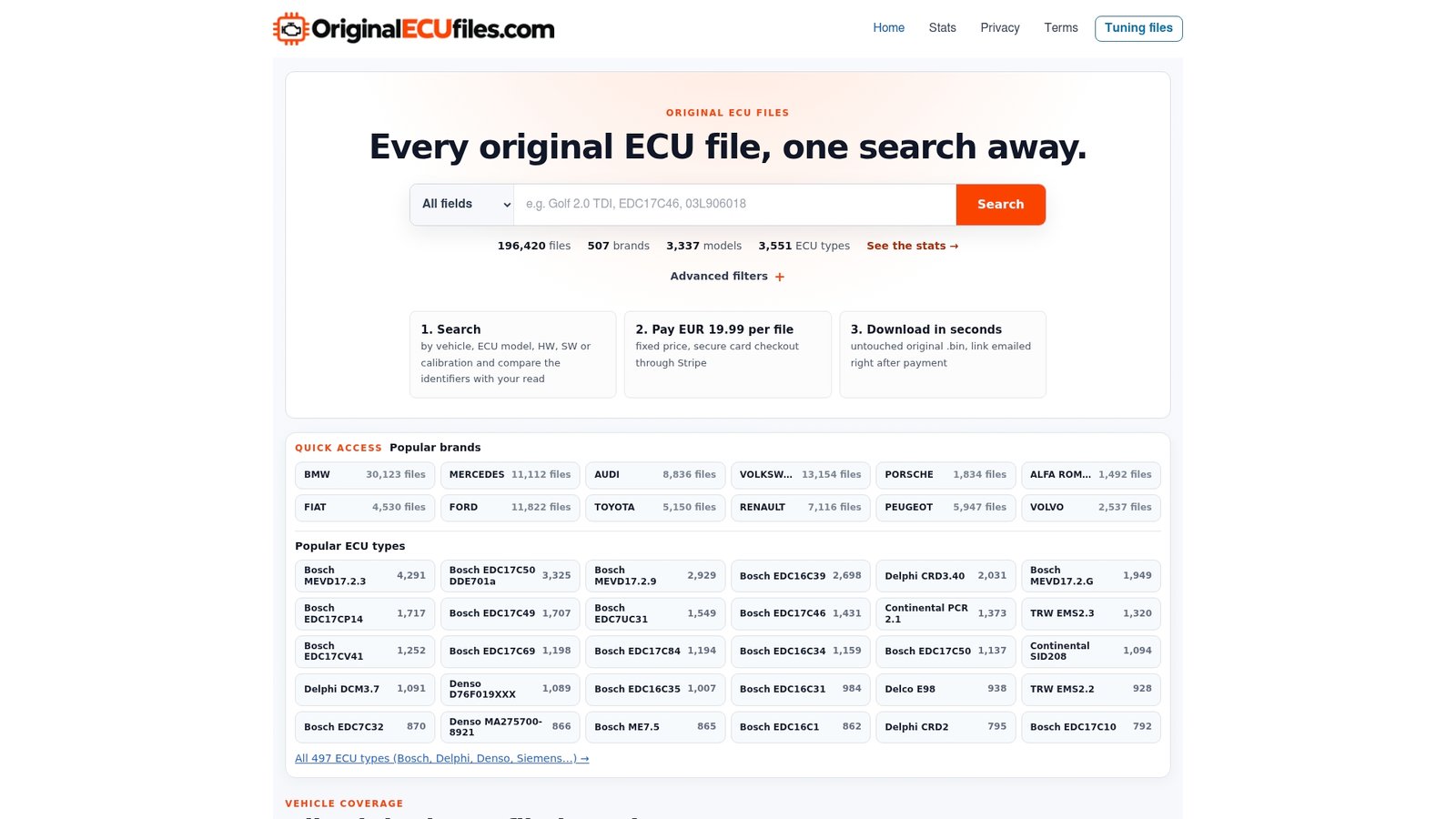
Compare the identifiers on the listing with your read before you check out, as in the checklist above.
FAQ
Can I be sure a file will work if the model and engine match?
No. Models can use different control units depending on engine, transmission, emissions spec, market or production date. Compare HW number, SW number and calibration ID against your own ECU read, and confirm the memory layout and checksum needs for your ECU family and tool.
I was charged but got no email. What now?
First confirm the charge is completed and not a pending hold. Then check the address on the payment receipt, plus spam and quarantine folders. If you still have nothing, contact the seller with the checkout email, date, amount and order confirmation.
Why do I see two charges for one file?
Often one is a temporary authorization hold from an earlier attempt, which the bank releases on its own schedule. Two completed charges with two orders is a genuine duplicate and should be raised with the seller, then your card issuer if needed.
Why does my statement not show exactly €19.99?
The price is €19.99 in euros. A card in another currency converts it at your issuer’s rate and may add a foreign transaction fee, so the statement amount depends on your card terms.
Sources
- Buying a Used Donor Module: The Pre-Purchase Checklist
- EEPROM Editor, ECU Data Editing for Workshops
- ECUHELP ECU File Comparison Before Writing Guide
- The Process of Calibration
- Payment declined or failed, Esano Help
- Held Funds, Pending or Duplicate Charges, Nintendo Support
- Why do I still have a pending charge if my payment failed?
- Pending card transaction, Chase UK
- Dispute a Visa debit or credit card payment, Nationwide
- Pricing, payments and price discrimination in the EU